Tutorial: Franka end to end
This tutorial runs the whole pipeline with the Franka Panda that ships with urdf2vla: from its URDF to 50 recorded demonstrations, a fine-tuned GR00T N1.7 model and its evaluation in simulation. Nothing asks you questions, so it is also the way to check your installation.
You need the installation finished, both containers running, and Hugging Face set up (step 5). The times below were measured on an NVIDIA L40S; steps 1–5 and 7 also run on a 16 GB RTX GPU.
Run every command in a terminal on your machine, in the urdf2vla folder with source .venv/bin/activate — not
inside a container.
| Step | Commands | Time |
|---|---|---|
| 1. Create the project | init |
instant |
| 2. Configure | inspect_robot → configure_camera |
~1 s |
| 3. Import into Isaac Sim | import_robot, launch_sim |
~2.5 min (more the first time) |
| 4. Record | configure_vla_interface, setup_teleoperation, collect_dataset |
~31 min for 50 demos |
| 5. Convert | convert_dataset |
~1 min |
| 6. Train | train_vla |
2 h 42 min (needs 44 GB) |
| 7. Evaluate | evaluate_vla |
~8 min for 20 episodes |
1. Create the project
A project is a folder. project.yaml is the only file in it you edit.
2. Configure robot, table and cameras
urdf2vla inspect_robot    --project projects/tutorial_franka
urdf2vla configure_robot  --project projects/tutorial_franka
urdf2vla configure_task   --project projects/tutorial_franka
urdf2vla configure_camera --project projects/tutorial_franka
inspect_robot finds the arm, the gripper and the hand in the URDF; configure_task places the table and bin within
reach and picks the objects (an apple, a lime, a pear and a colored cube); configure_camera places a wrist camera and
two external cameras like the DROID dataset.
Every command prints a JSON result; status and next tell you whether it worked and what to run next. To see the
setup now, run urdf2vla view.
3. Import the robot into Isaac Sim
urdf2vla import_robot --project projects/tutorial_franka
urdf2vla launch_sim   --project projects/tutorial_franka
import_robot converts the URDF to USD and runs 10 physics checks on the robot (joints follow their targets and stay
in their limits, the gripper opens, closes and holds its limits). launch_sim builds the pick-and-place environment
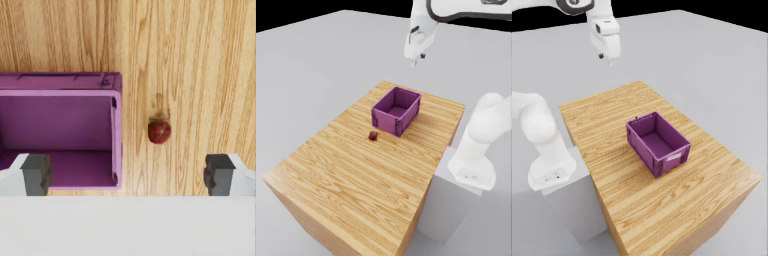
and checks the cameras, the objects and that each object stays in the hand when gripped. It saves what each camera
sees in snapshots/:
4. Record demonstrations
urdf2vla configure_vla_interface --project projects/tutorial_franka
urdf2vla setup_teleoperation     --project projects/tutorial_franka
urdf2vla collect_dataset         --project projects/tutorial_franka --device scripted --num-demos 50
The VLA sees the three images, the 7 joint angles and the gripper, and outputs joint targets and a gripper command.
collect_dataset --device scripted lets a scripted controller do the task with a random object at a random position
each time, and keeps only the successful episodes: 50 of 63 attempts, in 30 minutes. To drive the robot yourself, see
Record demonstrations. The 50 demonstrations from this run are on Hugging Face as
umegan/urdf2vla-franka-pickplace.
5. Convert
This writes the dataset in the format GR00T N1.7 reads, then loads it back with GR00T's own loader and checks that
every video matches the recording and that the model can learn when the gripper opens (gripper_timing).
6. Train
On a GPU with 44 GB or more, this fine-tunes GR00T N1.7 from nvidia/GR00T-N1.7-DROID for 10,000 steps (2 h 42 min,
41.6 GB on the L40S) and then checks that the trained model opens the gripper where the demonstrations do
(release_check: 10/10). On a smaller GPU it packages the job for another machine instead — see
Train and evaluate.
7. Evaluate
urdf2vla evaluate_vla --project projects/tutorial_franka \
  --model training/tutorial_franka_demos/checkpoints/checkpoint-10000 --episodes 20 --video
This starts the model in the GR00T container and lets it drive the robot in Isaac Sim, with a random object at a random
position in every episode. The result: 19 of 20 succeeded (the one failure closed on a pear without lifting it).
With --video, every episode is saved in build/eval_videos/ as the model sees it:
build/eval_report.yaml has every episode, with a name for each failure (never_closed, missed_grasp,
never_released, released_off_target). The model is on Hugging Face as
umegan/urdf2vla-franka-gr00t-n1.7.
Without a trained model
evaluate_vla --replay --dataset demos --episodes 3 plays the converted dataset back through the same server and
simulator instead of a model. If the object lands in the bin, the data format, the actions and the connection all
work — a quick check before you spend hours on training.
Next: bring your own robot.